PromptPay







บทความนี้ จะมาพูดถึง interface 3 ตัวนี้ IEnumerator, IEnumerable และ ICloneable ซึ่ง .net เตรียมไว้ให้เราไว้ใช้งาน โดยมีรายละเอียดดังนี้
เป็น interface พื้นฐานเพื่อให้ class ที่อ้างถึง interface นี้สามารถใช้ foreach ได้ ภายในประกอบไปด้วย
ตัวอย่าง เราจะสร้าง class Month ที่จะใช้งานกับ foreach ได้ โดยเราต้องสร้าง Class Month ที่ inherited interface IEnumerable แล้ว implement method GetEnumerator() โดยเราจะต้อง return เป็น class ที่ inherited interface IEnumerator ตามตัวอย่าง source code ดังนี้
using System;
using System.Collections;
using System.Collections.Generic;
using System.Linq;
using System.Text;
using System.Threading.Tasks;

namespace IEnumeratorExample {
    class Program {
        static void Main(string[] args) {

            Month objMonth = new Month();

            foreach (string item in objMonth) {
                Console.WriteLine(item);
            }

            Console.ReadKey();

        }
    }

    class Month : IEnumerable {

        public string[] arrMonth = new string[] { "January", "February", "March", "April", "May", "June", "July", "August", "September", "October", "November", "December" };

        public IEnumerator GetEnumerator() {
            return new AllMonth(this);
        }
    }

    class AllMonth : IEnumerator {

        private Month _month;
        private int index = -1;

        public AllMonth(Month inMonth) {
            _month = inMonth;
        }

        public object Current {
            get {
                return _month.arrMonth[index];
            }
        }

        public bool MoveNext() {
            index++;
            if (index < _month.arrMonth.Length) {
                return true;
            } else {
                return false;
            }
        }

        public void Reset() {
            index = -1;
        }
    }
}
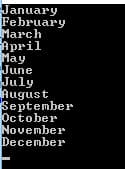
จะได้ผลลัพธ์ดังนี้
เป็น interface ที่จะทำการส่งคลาส IEnumerator ไปยังคำสั่ง foreach ภายในมีสมาชิกดังนี้
ตัวอย่าง ตัวอย่างนี้ผมจะสร้าง function ที่ return ค่าเป็นประเภท IEnumerable ในตัวอย่างนี้ผมใช้ yield ซึ่ง yield ใน C# จะถูกใช้ใน method ที่ return type IEnumerable
using System;
using System.Collections.Generic;
using System.Linq;
using System.Text;
using System.Threading.Tasks;

namespace IEnumerableExample {
    class Program {
        static void Main(string[] args) {

            foreach (int item in getNumber()) {
                Console.WriteLine("Number from getNumber(): " + item.ToString());
            }

            Console.ReadKey();

        }

        private static IEnumerable<int> getNumber() {
            yield return 1;
            yield return 2;
            yield return 3;
            yield return 4;
            yield return 5;
            yield return 6;
            yield return 7;
            yield return 8;
            yield return 9;
            yield return 10;
        }
    }
}
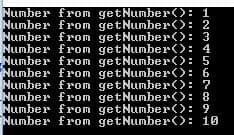
จะได้ผลลัพธ์ดังนี้
เป็น interface ที่กำหนดให้คลาสที่ประกาศต้องมีความสามารถในการ clone ตัวมันเอง
ตัวอย่าง ตัวอย่างเราจะสร้าง class ที่เก็บตัวเลข และสามารถ Clone ตัวเองได้ เขียนด้วยภาษา C# ดังนี้
using System;
using System.Collections.Generic;
using System.Linq;
using System.Text;
using System.Threading.Tasks;

namespace ICloneableExample {
    class Program {
        static void Main(string[] args) {
            myNumber obj1, obj2;

            obj1 = new myNumber(1);
            obj2 = (myNumber)obj1.Clone();

            obj1.number = 90;

            Console.WriteLine("obj1 number: " + obj1.number.ToString());
            Console.WriteLine("obj2 number: " + obj2.number.ToString());

            Console.ReadKey();
        }
    }

    class myNumber : ICloneable {

        private int _number = 0;

        public int number { get { return _number; } set { _number = value; } }

        public myNumber(int inNumber) {
            _number = inNumber;
        }

        public object Clone() {
            return new myNumber(_number);
        }
    }
}
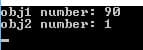
จะได้ผลลัพธ์ดังนี้
วิธี run sudo command ใน QProcess คือใส่ "/bin/sh -c" ข้างหน้าคําสั่งที่ต้องการเช่น
สวัสดีครับ ก่อนอื่นเรามาทําความรู้จักกับ Raspberry pi zero กันก่อน Raspberry pi เป็นคอมพิวเตอร์ขนาดเล็ก ซึ่งก็มีอยู่ด้วยกันหลายรุ่น แต่ในบทความนี้เราพูดถึงรุ่น Raspberry pi zero เป็นรุ่นที่มีขนาดเล็กที่สุด และราคาเพียง $5
nginx สามารถ config ให้ limit จํานวน request และ connection ได้ ทั้งนี้เพื่อป้องกันการ request เข้ามามากๆเกินความเป็นจริงที่ client จะทําได้